On-call: the load nobody reports until they leave
Your steadiest engineer says the rotation is fine, and the schedule agrees: even shifts, everyone taking their turn. Meanwhile somebody is carrying nights that never reach a record, and the first report of it that reaches you may be a resignation. This page has the six-question health pulse and the alert noise audit that make the real load visible, free to copy. The last section runs a tired six-person rotation through Aurora Coach and shows what came out the other side.
The rota looks fine on paper
Three costs never reach a record. The pages that turned out to be noise, which take the same sleep as the real ones. What a broken night takes out of the following day. And the three-in-the-morning fix that restores service, never gets revisited in daylight, and pages somebody else next month as a brand new event.
The Google SRE book named all of this years ago with toil and error budgets, and plenty of teams can quote it. Quoting it is not the hard part. Reducing on-call load competes with feature work every single period, and it loses by default unless something keeps putting it back on the table.
The rota shows six names. The pager knows two.
The on-call health pulse, free
Six questions, asked when a rotation ends rather than in a quarterly survey. Two weeks later the detail is gone and you get impressions instead of facts.
- How many times were you woken, and how many of those needed you specifically? Two numbers, not one. The gap between them is the part of the load that better routing or a written runbook could have removed entirely.
- What did you do the next day that you would not have done rested? The cost of a bad night lands the following day and never reaches an incident record. People remember this vividly and are almost never asked.
- Which alert do you now trust least? Everyone on a rota has one. Naming it gets you to the noisiest alert in the system faster than any dashboard will.
- Who did you escalate to, and were they on the rota? Tally the names across a quarter. The ones that keep appearing off-schedule are carrying load nobody assigned them, and no rota shows it.
- What did you fix during the shift that will page someone again next month? Separates restoring service from preventing the next call. Both are real work, and only one makes next month lighter. Where the restore half turns up as a delivery number is DORA metrics.
- Would you hand this rotation to a new joiner as it stands? The summary question. A rotation that only works because experienced people absorb its rough edges cannot be handed to anyone, and what that costs when an absorber leaves is senior engineer attrition.
The alert noise audit
Five steps, about an hour, no tooling. It turns a feeling everyone on the rota already has into a number the team can actually move.
- Take the last thirty pages, whatever they were Not a sample chosen for a meeting. The last thirty in order, including the ones everyone already knows are noise.
- Sort each into three piles Needed a human within minutes. Needed a human eventually. Needed nobody. Go fast and do not argue about edge cases; the proportions are the finding.
- Count the third pile as a share of the total Say that percentage out loud in the room. It usually lands higher than whoever owns the alerts expects, and the people answering the pages have never once been asked to state it.
- Take the single most frequent alert and ask what it would take to remove it Remove, not tune. Tuning a threshold moves the noise somewhere else. Ask what would have to be true for the alert to be unnecessary, then size that work like any other ticket.
- Give it an owner and a date, then re-run the audit next quarter Without the re-run this is an interesting afternoon. With it you get the same percentage three months later, sitting next to the old one. Fixes that get agreed and never shipped are postmortem follow-through.
Expect the first run to be uncomfortable. That is not an indictment of whoever configured the alerts, who added them one at a time, for good reasons, over several years.
What is alert fatigue?
What happens when a large share of alerts turn out not to need action, so people stop treating each one as though it might. The term comes from clinical alarm research, where the same pattern was studied in hospitals long before it reached software. People stop treating alerts as real because most of them are not, which is a rational response to a signal-to-noise ratio somebody else configured. The fix lives in the alerts, and asking people to try harder only postpones it.
How do you measure on-call health?
Ask after each rotation rather than in a quarterly survey, because the detail is gone within a fortnight. The useful signals are how often someone was woken versus how often they were needed, what the following day cost, who got escalated to whether or not they were on the rota, and whether the work done during the shift prevents the next page or merely ends this one. None of that appears in an incident record.
What is a healthy on-call rotation?
There is no universal number, and rotations differ too much for a benchmark to mean much. A workable test is whether you would hand the rota to a competent new joiner without warning them about its quirks. If it only functions because experienced people absorb its rough edges, the load is real, it is concentrated on your most capable engineers, and it is invisible to the schedule.
From “I’m fine” to changes: a worked example
Simulated team · Real product output Harborline Systems is a fictional B2B infrastructure company: 150 people, managed hosting and a logistics SaaS, 24/7 uptime commitments. Its six-engineer platform team carries the on-call. We scripted the inputs and ran them through Aurora Coach in production. Everything below is the product's real output.
1Sense and analyze
Everyone on the team answers structured questions in their own words, and can take any thread further in a check-in conversation with the AI coach. Those sessions roll up into a team analysis with category scores and recommendations.
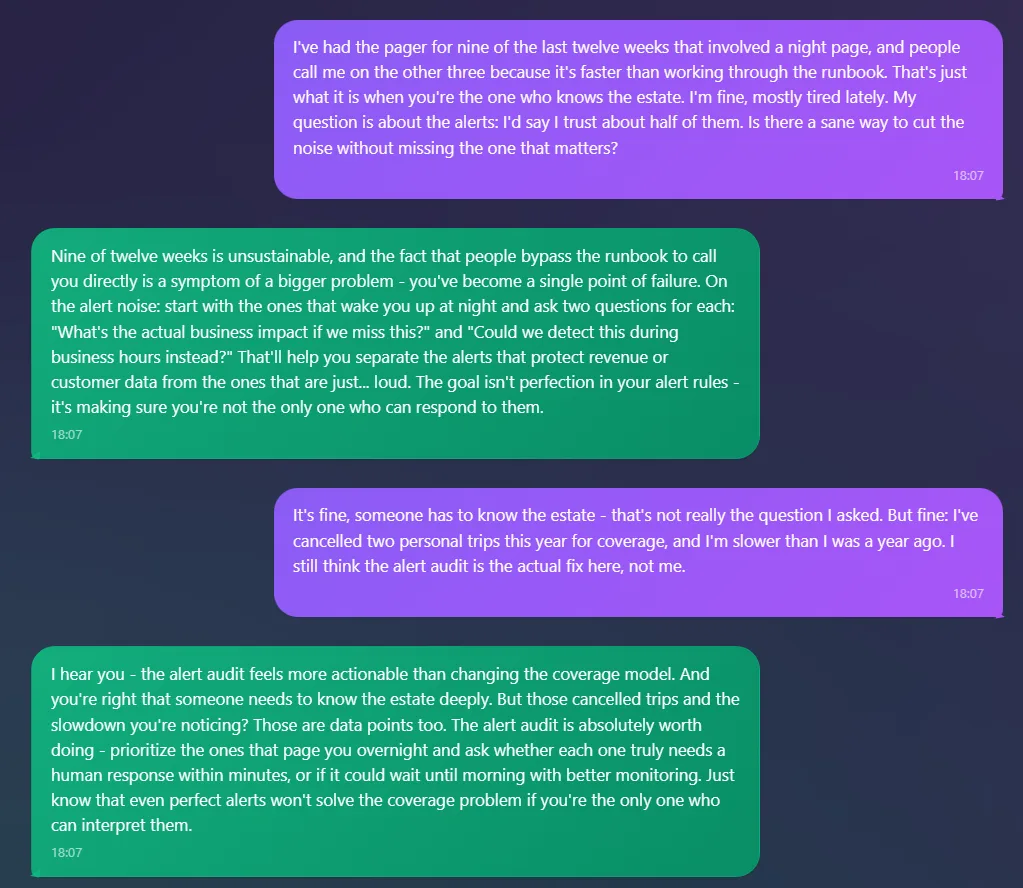
What the coach does with “I’m fine”
A senior engineer reports carrying the pager for nine of the last twelve weeks that had a night page, calls himself fine, and asks about alert noise instead. The coach does not take the frame: “you've become a single point of failure.” He pushes back and mentions two cancelled trips on the way past. The reply holds both threads: audit the alerts, and “even perfect alerts won't solve the coverage problem if you're the only one who can interpret them.”
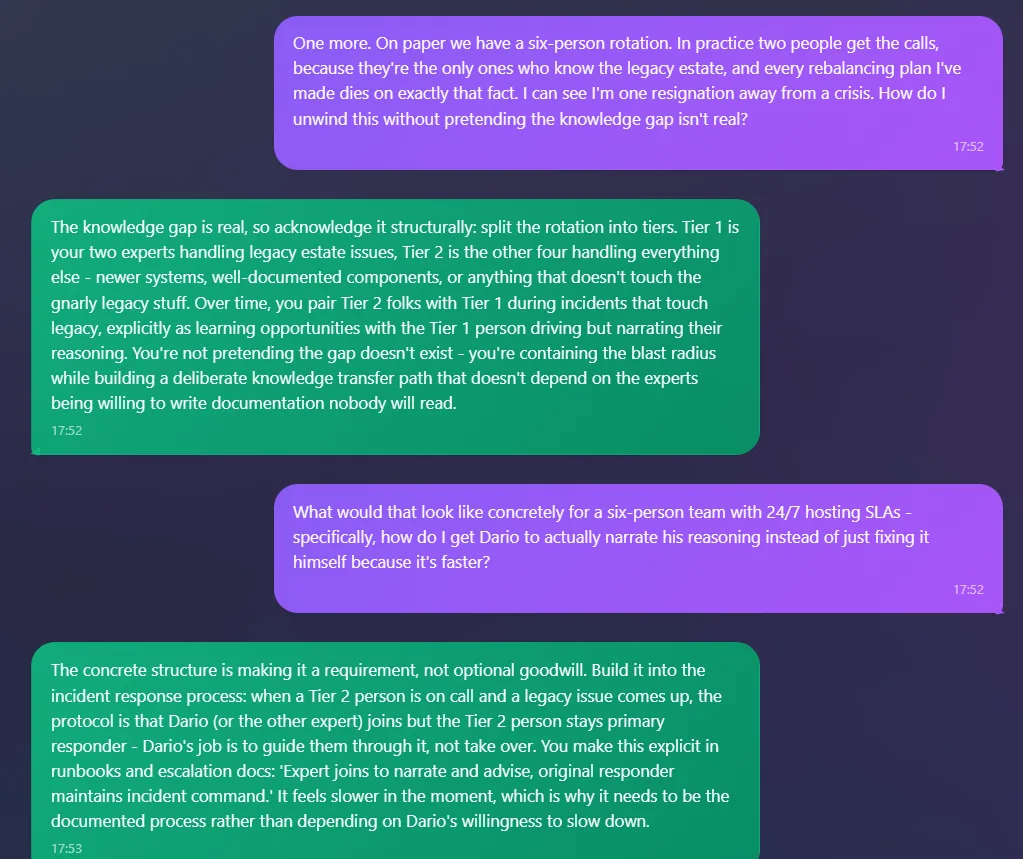
The rota that says six and pages two
The team lead brings the same rotation from her side: “On paper we have a six-person rotation. In practice two people get the calls,” and every rebalancing plan she has made died on that fact. “I can see I'm one resignation away from a crisis.” The answer is structural. Split the rotation into two tiers, put the other four alongside the two experts on legacy incidents as those happen, and write the handover into the runbooks: “Expert joins to narrate and advise, original responder maintains incident command.”
2Recommend, refine, commit
The analysis turns its recommendations into concrete suggestions the team votes on and commits to. The AI informs the decision, it does not make it.
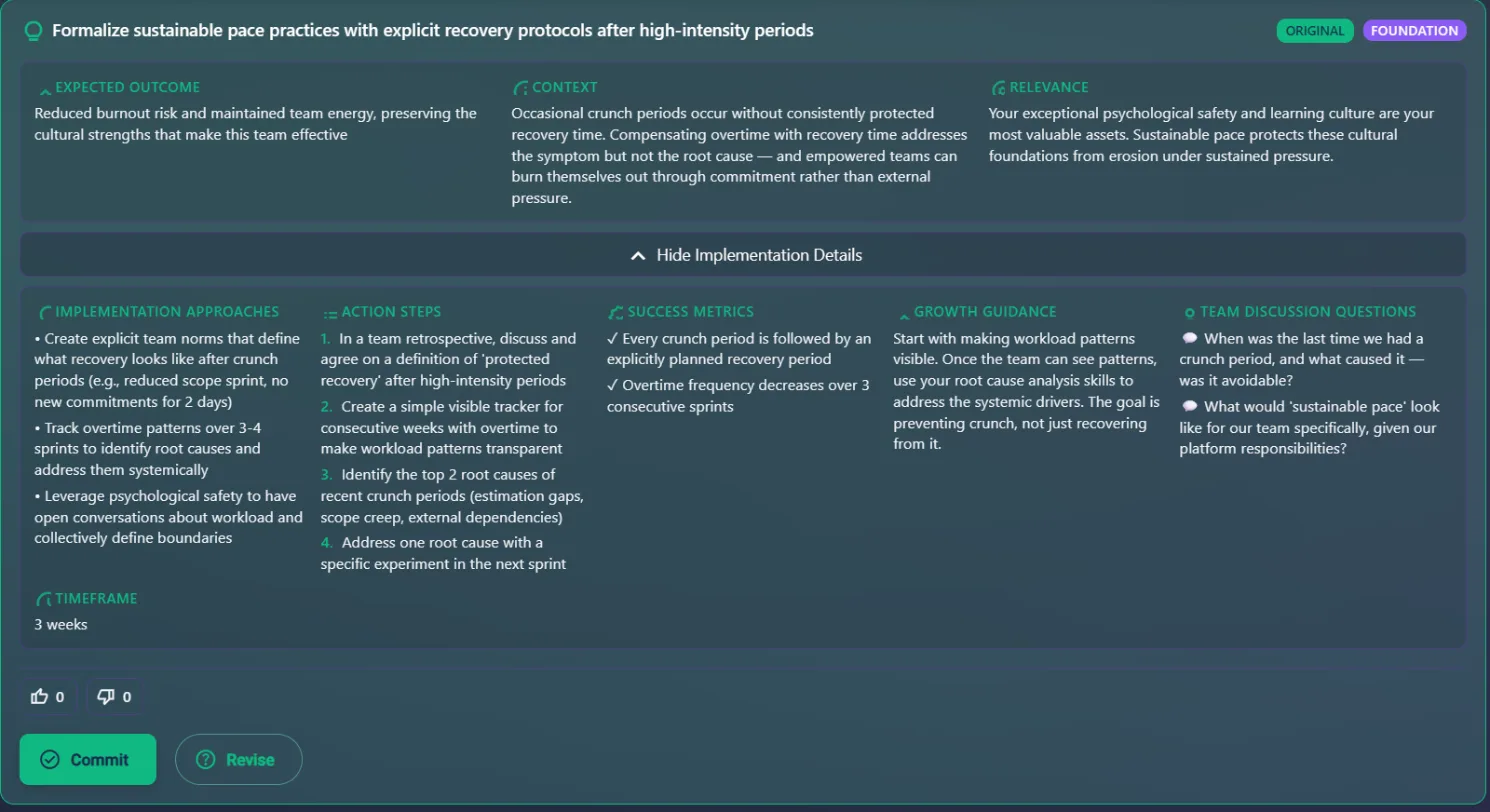
From a tired engineer's answers to something the team can vote on
One of twelve suggestions generated for this team: protected recovery after high-intensity periods, with action steps, success metrics and a three-week timeframe. The Context field is where a template would show, and instead it names this team's actual trap and refuses it: compensating overtime with recovery time “addresses the symptom but not the root cause.” A generic burnout playbook cannot turn down its own easy answer. This one just did, because it knows whose pager went off nine weeks out of twelve.
3Execute and re-evaluate
The team does the work in its own context, and the next period's analysis asks whether the noise share moved and whether the off-rota escalations still land on the same person. Harborline has run one period, so the trend view starts when the second one lands.
This is one use case. How the full product works is on the product overview.
Not ready to change anything today? You already have the health pulse and the noise audit above, copy buttons and all. If you want one improvement loop like these in your inbox each month, leave your email.
What this page cannot tell you is which of it applies to your team, this quarter. Aurora Coach works that out from your team's own words, recommends next steps with the reasoning, and the next period shows whether it held.
Both are free. The ROI mapper needs no signup and takes about two minutes. What team members write stays private to them: see AI governance.